
Run Claude-Mem on a remote server
Memory for Claude Code, Codex and T3 Code, on a VM that never sleeps.
Shelley handles the setup. About 10 minutes.
Prefer a terminal?
curl -fsSL https://exe-staging.dev/deploy/claude-mem/prompt.txt | ssh exe.dev new --prompt=/dev/stdinClaude-Mem gives coding agents a memory. Hooks hand each prompt and tool call to a small local worker; a second model turns them into short notes; the next session in that project starts with an index of those notes and can search them for details. It works with Claude Code, Codex, T3 Code and a dozen other agents.
Memory is most useful next to agents that keep working. On an exe.dev VM they run while your laptop sleeps, the memory database sits on the VM's persistent disk, and the viewer is private behind exe.dev's login. Claude Code and Codex come preinstalled and use exe.dev's LLM integration, and so does Claude-Mem's observer here: no API keys, no Claude login, and no claude-mem account.
exe.dev gives you persistent Linux VMs with HTTPS, sign-in and a coding agent built in; this page sets up Claude-Mem on one.
What you get#
- Claude-Mem 16 installed for Claude Code and Codex, its worker a service on port 3777 that comes back after a reboot
- The observer writing memories through exe.dev's LLM integration, with no API key, Claude login or claude-mem account
- A second Claude Code session that recalls what the first one did
- The memory viewer at
https://<vm>.exe.xyz:3777/viewer, behind exe.dev login - Daily snapshots of the memory database in
~/.claude-mem/backups/auto, and Claude-Mem's telemetry off
What's running, and where
https://my-claude-mem.exe.xyz:3777/viewer
the memory viewer, behind exe.dev login
ssh my-claude-mem.exe.xyz
your agents, settings and upkeep
Deploy with Shelley#
Click Deploy and Shelley will set up Claude-Mem on a new VM, then check that it works. No config-file wrangling required.
Prefer a terminal?
curl -fsSL \
  https://exe-staging.dev/deploy/claude-mem/prompt.txt \
  | ssh exe.dev new --prompt=/dev/stdin
What Shelley is told
Set up Claude-Mem on this VM by following the exe.dev recipe at https://exe-staging.dev/deploy/claude-mem.md?via=deploy from top to bottom.

The recipe's example VM name is my-claude-mem. This VM's name is the output of `hostname`: use it wherever the recipe writes my-claude-mem. Skip the step that creates the VM; you are on it.

You are done when all of these are true. Check each one yourself:
- Claude-Mem 16 installed for Claude Code and Codex, its worker a service on port 3777 that comes back after a reboot
- The observer writing memories through exe.dev's LLM integration, with no API key, Claude login or claude-mem account
- A second Claude Code session that recalls what the first one did
- The memory viewer at `https://<vm>.exe.xyz:3777/viewer`, behind exe.dev login
- Daily snapshots of the memory database in `~/.claude-mem/backups/auto`, and Claude-Mem's telemetry off

Read the whole recipe, including the closed details. Follow "Set up by
hand" first, skipping VM creation and SSH, then run the memory check in
"See it remember" (both sessions). Don't run Restore, Update, or the
sharing and token examples. Don't sign in to claude-mem or open the
sign-in link the installer prints: this setup needs no account. If
`~/.claude-mem/settings.json` already exists, merge the settings into it as
written instead of replacing it. Do not open interactive `codex` or
`claude`; tell the owner that Codex asks them to trust the hooks the first
time they open it. Verify that `systemctl --user is-active claude-mem` says
`active`, that `ss -ltn` shows `0.0.0.0:3777`, and that the second session
mentions the Faroe Islands. Do not reboot. Finish by giving the owner the
viewer URL with this VM's name.

Finish with the URLs I should open.
Also at /deploy/claude-mem/prompt.txt. The recipe it follows is /deploy/claude-mem.md.
See it remember#
Memory starts with your second session in a project. On the VM, give Claude Code something to remember:
cd ~/project
claude -p "Create shipping.py with shipping_cents(weight_grams, country): 450 cents under 500 g, 990 otherwise, and raise ValueError for the Faroe Islands (country 'FO'). Add a test and run it with python3." \
  --permission-mode acceptEdits --allowedTools "Bash(python3:*)"
Give the observer half a minute, then ask a fresh session, which isn't allowed to look at the code:
claude -p "Without reading files or running commands: what do you know about shipping to the Faroe Islands in this project?" \
  --disallowedTools "Read,Bash,Grep,Glob,Edit,Write"
It answers from memory: shipping_cents refuses the Faroe Islands, with the
note that it hasn't checked the files since. The same works in interactive
claude sessions, in T3 Code threads, and in Codex once you've trusted
Claude-Mem's hooks there (below). Agents can also
search their memory on purpose: ask Claude to use /mem-search.
Open the viewer#
Open https://my-claude-mem.exe.xyz:3777/viewer and log in to exe.dev.
Port 3777 is private: only you, and people you
share the VM with, get past the login.
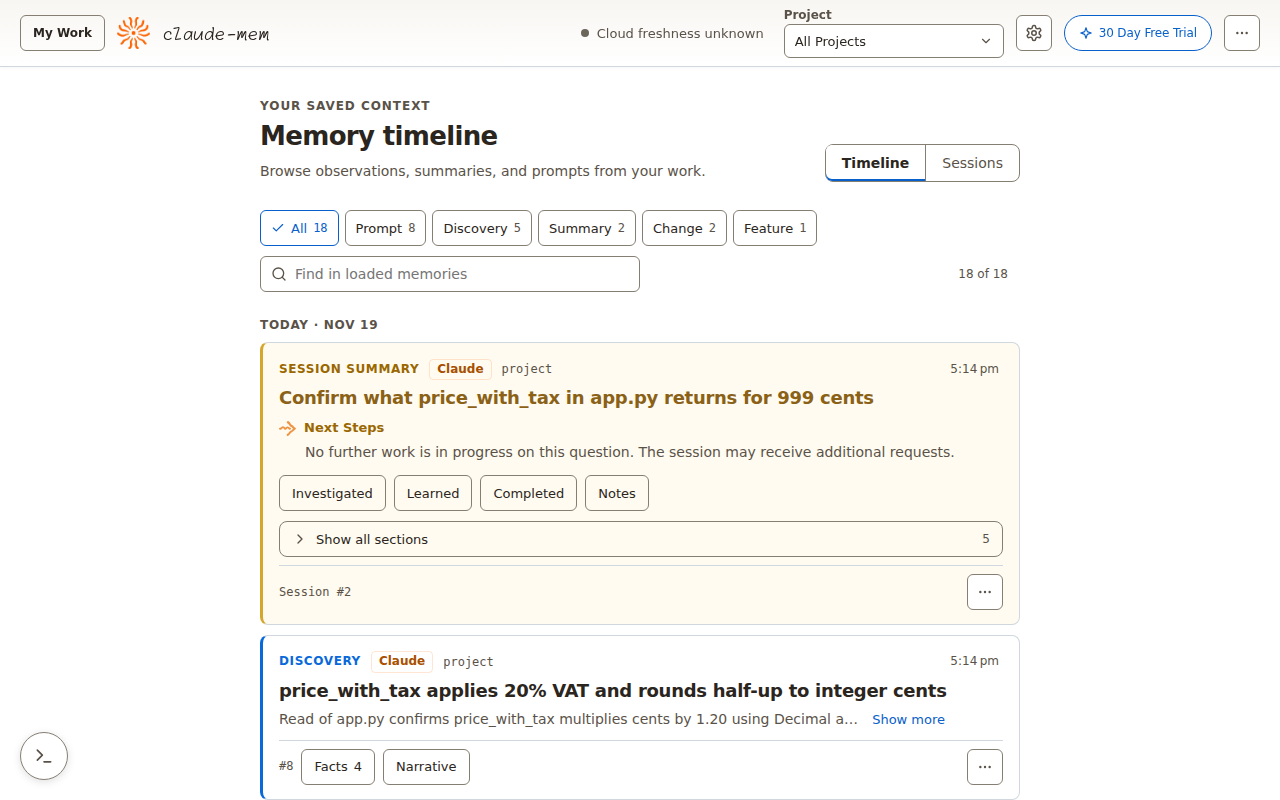
The timeline updates live as agents work, and Sessions groups the notes by session. A few things the viewer does differently through exe.dev's proxy:
- Settings are read-only. The worker accepts settings changes only
from the VM itself, so edit
~/.claude-mem/settings.jsonand runsystemctl --user restart claude-mem. - My Work, the live request page at
/, also answers only the VM itself. To use it, forward the port from your computer withssh -L 3777:localhost:3777 my-claude-mem.exe.xyzand openhttp://localhost:3777/. - Ignore the trial button. It's for CMEM Pro, which this setup doesn't use.
Warning
Anyone who can open port 3777 can read every prompt and note in your memory and use the worker's API. Keep it private, and share the VM only with people who could read your agents' sessions anyway.
Codex and T3 Code#
Codex runs Claude-Mem's hooks only after you trust them. The first time
you run codex on the VM it asks; choose Trust all and continue (or
review them with /hooks). Until then, Codex sessions, including
codex exec, aren't recorded.
T3 Code uses the same Claude Code and Codex on this VM, so its threads
are recorded as soon as Claude-Mem is installed; no extra step. If you run
T3 Code with custom provider homes, also run
npx claude-mem@16 install --ide t3code < /dev/null and
systemctl --user restart claude-mem. To add T3 Code to this VM, follow
Run T3 Code on a remote server; Herdr
works the same way.
A new session gets notes from every agent, so Claude knows what Codex did in the same project. Each note is tagged with the agent that made it.
What it records#
Claude-Mem records your prompts, the files agents read and edit, the
commands they run and their output, and copies of screenshots tools take
(in ~/.claude-mem/media-v1). The observer model sees that activity to
write its notes. To keep something out:
- Wrap it in
<private>…</private>in a prompt; it's never stored. - Turn on auto-redaction
of keys and tokens: add
"CLAUDE_MEM_REDACT_ENABLED": "true"to~/.claude-mem/settings.jsonand restart the service. - Keep secrets off the VM to begin with: exe.dev integrations add credentials at the network edge, so they never show up in a command's output. See agent secrets.
Search memory from a script#
The worker has an HTTP API, and exe.dev's proxy accepts VM tokens in place of a browser login. On your computer, make a token for this VM and search:
TOKEN=$(ssh exe.dev ssh-key generate-api-key --vm=my-claude-mem --label=memory)
curl -H "X-Exedev-Authorization: Bearer $TOKEN" \
  "https://my-claude-mem.exe.xyz:3777/api/search?query=Faroe"
The answer is the same compact index the agents get, with an ID for each note. Treat the token like a password: it reads all of your memory.
The nuts and bolts#
Claude-Mem's data is in ~/.claude-mem, its settings in
~/.claude-mem/settings.json and ~/.claude-mem/.env, and its log in
~/.claude-mem/logs.
Set up by hand
Create the VM#
On your computer, create a VM and connect. Pick any free name; if you've already clicked Deploy or have a VM, skip the first command and use its name:
ssh exe.dev new --name=my-claude-mem
ssh my-claude-mem.exe.xyz
Connect the agents and install Node.js#
On the VM, connect Claude Code and Codex to the LLM integration, install
Node.js 24 (Claude-Mem's installer runs with npx), and make a project. It's
a Git repository, so you can review and undo what agents change:
exeuntu configure claude
exeuntu configure codex
curl -fsSL https://deb.nodesource.com/setup_24.x | sudo -E bash -
sudo apt-get install -y nodejs
git init ~/project
Install Claude-Mem#
Still on the VM, install Claude-Mem for Claude Code, then for Codex. The
installer fetches Bun and the plugin, registers the hooks, and puts a
claude-mem command in ~/.local/bin. --provider claude runs the
observer locally instead of on CMEM Pro, with no sign-in; the Codex install
keeps that choice. The installer still prints an optional sign-in link at
the end, which you can ignore. The last line turns off Claude-Mem's
anonymous usage analytics:
npx -y claude-mem@16 install --ide claude-code --provider claude --no-auto-start < /dev/null
npx -y claude-mem@16 install --ide codex-cli --no-auto-start < /dev/null
npx -y claude-mem@16 telemetry disable
Each install ends with Installation complete.
Point the observer at exe.dev#
The observer runs Claude Code's engine with its own settings, so it needs the LLM integration's address too. The integration needs no key; Claude wants one anyway, and any value works. Then move the worker to port 3777, where exe.dev's HTTPS proxy can reach it, accept the VM's address, show every agent's notes at session start, and take a daily snapshot of the database:
cd ~/.claude-mem
printf 'ANTHROPIC_BASE_URL=https://llm.int.exe.xyz\nANTHROPIC_AUTH_TOKEN=implicit\n' >> .env
jq --arg origin "https://$(hostname).exe.xyz:3777" '. + {
  CLAUDE_MEM_CLAUDE_AUTH_METHOD: "gateway",
  CLAUDE_MEM_MODEL: "claude-haiku-5-5",
  CLAUDE_MEM_WORKER_HOST: "0.0.0.0",
  CLAUDE_MEM_WORKER_PORT: "3777",
  CLAUDE_MEM_ALLOWED_ORIGINS: $origin,
  CLAUDE_MEM_SESSION_START_INCLUDE_ALL_SOURCES: "true",
  CLAUDE_MEM_BACKUP_ENABLED: "true"
}' settings.json > settings.new && mv settings.new settings.json
chmod 600 settings.json .env
cd ~
The observer uses Claude Haiku 5.5. Any Claude model from
curl -s https://llm.int.exe.xyz/v1/models works; leave off the
anthropic/ prefix.
Run it as a service#
A systemd user service starts the worker on every boot, so the viewer is there even before an agent runs (exe.dev VMs keep user services running without a login):
mkdir -p ~/.config/systemd/user
cat > ~/.config/systemd/user/claude-mem.service <<'EOF'
[Unit]
Description=Claude-Mem worker
After=network-online.target

[Service]
Type=oneshot
RemainAfterExit=yes
ExecStart=%h/.local/bin/claude-mem start
ExecStop=%h/.local/bin/claude-mem stop

[Install]
WantedBy=default.target
EOF
systemctl --user daemon-reload
systemctl --user enable --now claude-mem
Check it#
claude-mem status
curl -s http://localhost:3777/api/health
The status says Worker is running on port 3777, and the health check
answers with JSON. Now run the two sessions in
See it remember.
Back up and restore
The worker snapshots the memory database once a day and keeps the last
seven in ~/.claude-mem/backups/auto. On the VM:
npx -y claude-mem@16 backup run      # take one now
npx -y claude-mem@16 backup list     # what's on disk
npx -y claude-mem@16 backup status   # last snapshot and next run
Snapshots live on the VM's disk. To keep one elsewhere, copy it to your
computer with scp, or copy the whole VM, which includes your project and
agent settings (on your computer; choose a free name):
ssh exe.dev cp my-claude-mem my-claude-mem-backup
To restore, pick a snapshot from backup list and run, on the VM:
npx -y claude-mem@16 restore ~/.claude-mem/backups/auto/claude-mem-2026-11-19T17-15-20-144Z.db
npx -y claude-mem@16 backup status
restore restarts the worker with the snapshot and keeps the database it
replaced next to it as claude-mem-<time>-pre-restore.db, so you can undo
it. The Chroma index rebuilds from the database on its own.
To move Claude-Mem to a new VM, set it up there as above, stop the service,
copy ~/.claude-mem/claude-mem.db across, and start it again. Keep the new
VM's own settings.json and .env.
Update
Claude-Mem updates itself: once a day it checks for a release its
maintainer has promoted and installs it while the agents are idle, keeping
your settings. To turn that off, add "CLAUDE_MEM_AUTO_UPDATE": "false"
to ~/.claude-mem/settings.json.
To update right away, on the VM, update the plugin and runtime, which keeps your provider and gateway settings, refresh the Codex plugin, and restart the service:
npx -y claude-mem@16 update < /dev/null
npx -y claude-mem@16 install --ide codex-cli --no-auto-start < /dev/null
systemctl --user restart claude-mem
claude-mem status
For a new major version, read the
release notes first,
then use @17 and so on. Codex may ask you to trust changed hooks again.
Update the agents with sudo exeuntu update claude and
sudo exeuntu update codex.
Something not working?
Start with npx -y claude-mem@16 doctor, which checks Bun, uv, the hook
launcher and the worker. The worker's log is
~/.claude-mem/logs/claude-mem-<date>.log.
- No memories, and the log says
Not logged in · Please run /login. The observer isn't using the LLM integration. Check that~/.claude-mem/.envhas bothANTHROPIC_BASE_URLandANTHROPIC_AUTH_TOKEN, andsettings.jsonhasCLAUDE_MEM_CLAUDE_AUTH_METHODset togateway, thensystemctl --user restart claude-mem. Re-running the installer with--provider claudeclears both; leave the flag off after the first install. - The log says
402 LLM credits exhausted. Your exe.dev LLM credits ran out; the observer drops that batch and carries on when they refresh. - The viewer says
Host ... is not trusted. The VM's name changed: setCLAUDE_MEM_ALLOWED_ORIGINSto the newhttps://<name>.exe.xyz:3777and restart. - The viewer doesn't load.
ss -ltn | grep 3777should show0.0.0.0:3777. If the worker is on127.0.0.1:37700instead, it started before the settings change: stop it withsystemctl --user stop claude-mem; pkill -f worker-service.cjs, thensystemctl --user start claude-mem. - Codex sessions don't show up. Run
codexin the project and trust the hooks (/hooks). - The second session doesn't remember. Memory is per project (the folder you start the agent in), and the first session's notes need a few seconds after it ends. Check the viewer for them.
For everything else, see Claude-Mem's troubleshooting guide.
Frequently asked questions#
Do I need a claude-mem account or CMEM Pro?
No. Without a --provider flag the installer offers CMEM Pro, a hosted observer on cmem.ai that you sign in to by email (its 30-day trial asks for a payment method). This page uses --provider claude and points that observer at exe.dev's LLM integration, so the memories are written on the VM, with no account. Cloud Sync to cmem.ai and TeamBrain, the shared team memory, are the parts that need one.
How much does it cost?
Claude-Mem is free and open source (Apache-2.0). You pay for the VM as part of your exe.dev plan. The observer makes a small Claude Haiku call for each batch of tool activity and a summary per session, billed to your exe.dev account like the agents' own usage; see the models and prices. The code--chill mode records fewer observations.
Where is my memory stored, and what leaves the VM?
In ~/.claude-mem on the VM's disk: a SQLite database, a Chroma index and saved screenshots. The observer's model calls go through exe.dev's LLM integration to the model provider. This page turns Claude-Mem's anonymous telemetry off; Cloud Sync stays off unless you sign in and turn it on. When the installer prints its optional sign-in link, it has asked cmem.ai for it, sending the VM's name and a count of observations and tokens per day, but no prompts, paths or project names. Each install run does that; update doesn't.
Can several VMs share one memory?
Yes. Agents on other VMs can send their sessions to this VM's worker and read its memory, through an exe.dev VM-to-VM integration, so port 3777 stays private. See Share memory across VMs.
Which agents does it work with?
This page sets up Claude Code and Codex, which T3 Code and Herdr use on this VM too. Claude-Mem also has integrations for OpenCode, Pi, Cursor, Gemini CLI and more (npx claude-mem --help lists the --ide values), which we didn't test here.
Claude-Mem or Claude Code's own memory?
They work side by side; the installer leaves Claude Code's auto-memory on. Claude Code's memory is notes the agent chooses to write. Claude-Mem records every session as it happens, works across Claude Code and Codex, and adds search and a viewer.
Published Nov 21, 2026 · Updated Nov 21, 2026 · tested end to end Nov 19, 2026 · Markdown · manifest.json · Something wrong? Tell us